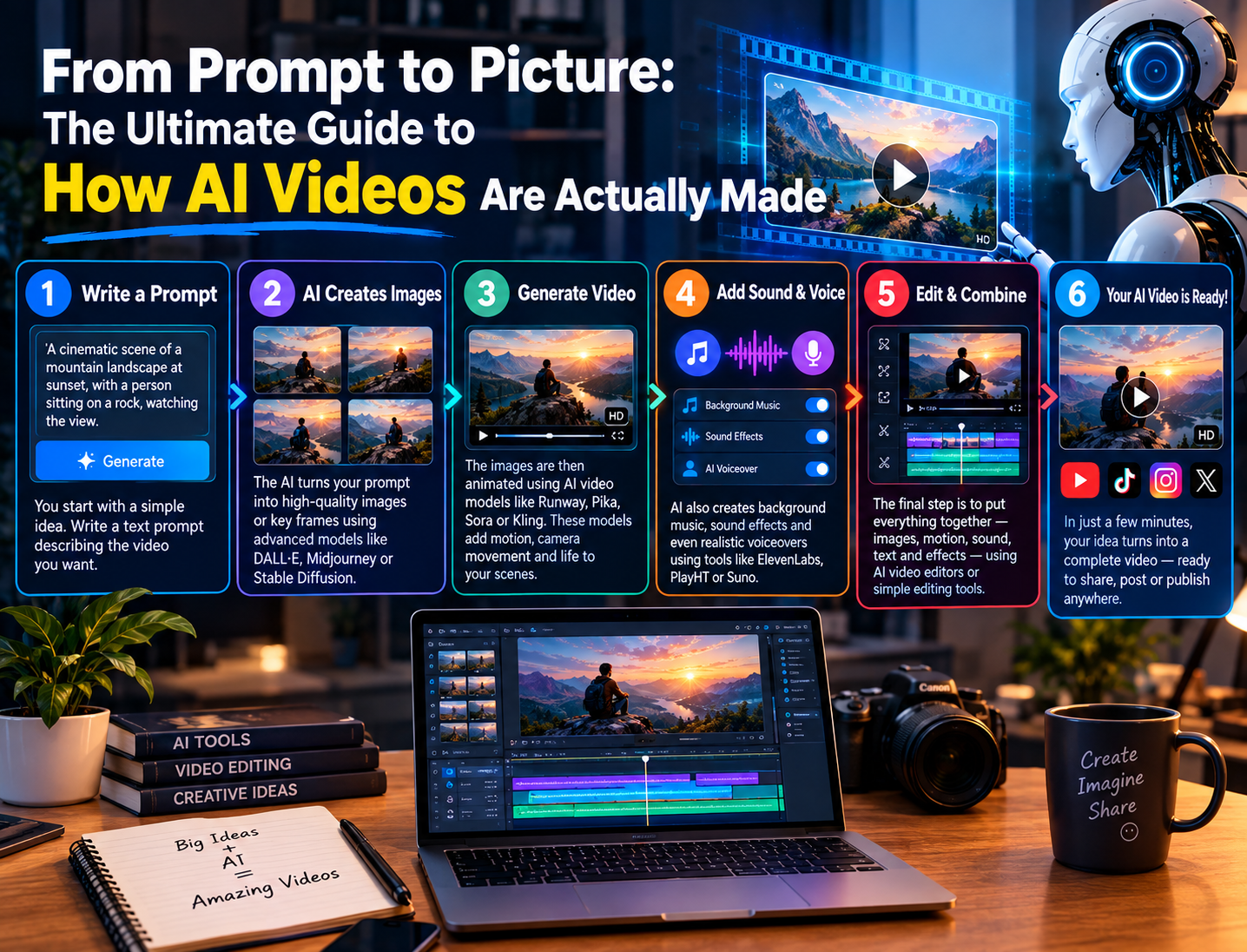
Artificial intelligence has completely transformed how videos are created. What once required a camera crew, actors, editing software, and weeks of work can now be done in minutes using nothing but a text prompt. If you have ever watched a hyper-realistic AI-generated clip on YouTube or Instagram and wondered “how is this even possible?”, this article breaks down exactly how AI videos are made, step by step, using the same technology and tools that professional creators rely on today.
What Is an AI Video?
An AI video is a video that is fully or partially generated by artificial intelligence models instead of being filmed with a camera. These models are trained on massive datasets of real video footage, images, and text, allowing them to learn patterns like motion, lighting, physics, and human expression. Once trained, the AI can generate brand-new video content from a simple text description, an image, or even an existing video clip.
There are three broad categories of AI video creation:
- Text-to-video – You type a description, and the AI generates a matching video from scratch.
- Image-to-video – You upload a photo, and the AI animates it into a moving scene.
- AI avatar and voice cloning videos – A digital human or cloned voice delivers a script, often used for explainer videos, tutorials, and faceless YouTube channels.
Step 1: The Idea and Script
Every AI video starts with a concept, exactly like traditional filmmaking. Creators write a short script or a detailed prompt describing the scene, characters, camera movement, mood, and setting. The quality of this prompt directly affects the quality of the output. A vague prompt like “a man walking” produces generic results, while a detailed prompt specifying lighting, camera angle, emotion, and background produces far more cinematic footage.
Many faceless YouTube channels and AI content creators use large language models like Claude or ChatGPT first to write the script and break it into scenes, before feeding each scene into a video generation model.
Step 2: Choosing the Right AI Video Model
This is where most of the “magic” happens. In 2026, there is no single best AI video generator; different tools specialize in different tasks.
- Google Veo is widely regarded as one of the strongest all-around models for realistic footage with strong adherence to text and image prompts, making it a favorite for marketing-style clips.
- OpenAI’s Sora is known for polished visual mood and strong narrative concepting, ideal for cinematic storytelling.
- Kling is a popular choice for everyday production work such as B-roll, product shots, and transitions, offering a good balance of cost and quality.
- ByteDance’s Seedance has become known for extremely fast generation speeds and high success rates, making it useful for creators who need to test many prompt variations quickly, especially for premium hero shots.
- Runway is favored for its camera control and generative editing features, giving creators more precise control over motion.
- HeyGen and similar avatar platforms specialize in AI presenters, voice cloning, and multi-language dubbing, which is extremely popular for explainer and tutorial content.
- InVideo AI takes a different approach entirely, assembling videos from a massive library of stock footage combined with AI voiceover and automated editing, rather than generating pixels from scratch.
Many professional teams now use an “aggregator” approach, mixing several models within a single project depending on which shot needs which strength, since no single model performs best across every scenario.
Step 3: Generating the Footage
Once a model is selected, the creator inputs their prompt (and optionally a reference image) into the platform. The AI model processes this using a technique called diffusion, where it starts with random visual noise and gradually refines it, frame by frame, into a coherent video that matches the prompt. This process typically takes anywhere from 30 seconds to a few minutes per clip, depending on the model, video length, and resolution requested.
Behind the scenes, the model must solve incredibly complex problems: object permanence (does a person’s face stay the same across frames?), physics (does water splash correctly, do objects fall naturally?), and temporal consistency (does the scene flow smoothly without flickering or morphing). These remain the biggest technical challenges in AI video generation, and different models handle them with varying degrees of success.
Step 4: Adding Audio, Voice, and Music
Video is only half the equation. Many modern AI video tools now generate native audio alongside the visuals, including ambient sound, sound effects, and even dialogue. For voiceover-driven content, creators often use separate AI voice generators or voice cloning tools to narrate scripts in a natural-sounding human voice, sometimes in dozens of languages.
Background music, generated or licensed, is then layered in, along with sound effects that match on-screen actions, giving the final video a professional, polished feel.
Step 5: Editing and Post-Production
Raw AI-generated clips are rarely used exactly as they come out of the model. Editors stitch multiple AI-generated clips together, trim awkward frames, remove unwanted objects or artifacts, color-correct the footage, and add captions, transitions, and text overlays. Many creators use dedicated post-production tools to clean up distracting elements that AI models sometimes introduce, such as extra fingers, warped backgrounds, or inconsistent lighting between shots.
Step 6: Export and Optimization
The final step is exporting the video in the correct format and resolution for its destination platform, whether that is YouTube, TikTok, Instagram Reels, or a client’s website. Creators also optimize thumbnails, titles, and descriptions at this stage to maximize watch time and engagement, which directly affects monetization performance.
Why AI Video Creation Is Exploding
The appeal is obvious: AI video generation removes the traditional barriers of cost, equipment, and crew size. A single creator with a laptop and a subscription to one or two AI platforms can now produce content that would have previously required a full production studio. This has fueled the rapid growth of faceless YouTube channels, AI-generated shorts, and automated content pipelines across nearly every niche.
Final Thoughts
AI video generation in 2026 is no longer a novelty; it is a legitimate production pipeline used by solo creators, marketing agencies, and even film studios. Understanding the workflow, from scripting and model selection through generation, audio, editing, and export, gives creators a real advantage in producing high-quality content faster and at a fraction of the traditional cost. As these models continue to improve, the line between AI-generated and camera-shot footage will only keep blurring.