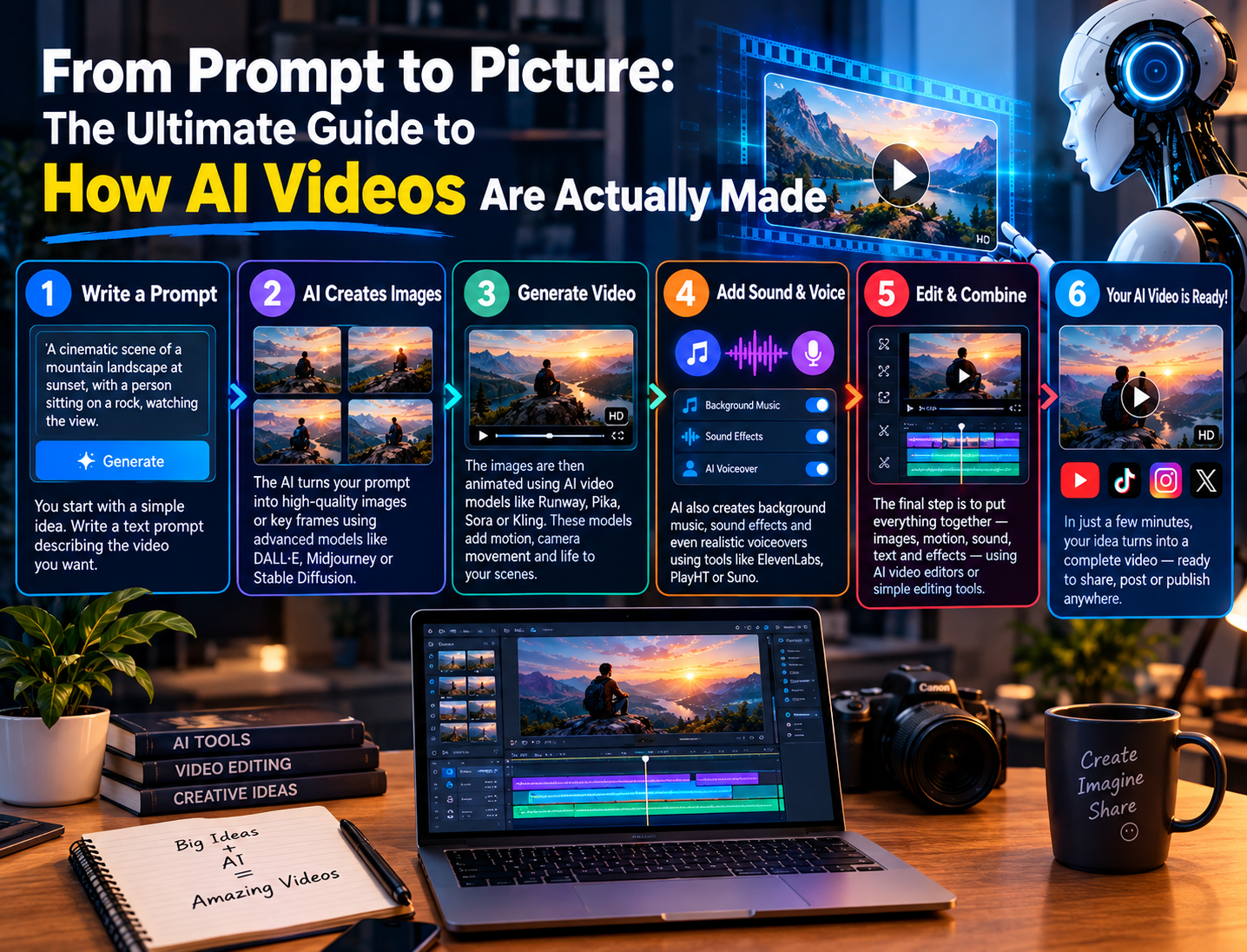
The internet is drowning in content. But the one thing that stops the scroll dead in its tracks? Video. And now, thanks to Artificial Intelligence, video creation has been ripped from the hands of Hollywood studios and placed directly into yours.
But how does it actually work? Is it magic? Is it just a fancy filter? The truth is far more fascinating.
If you have ever typed a sentence into a tool and watched a video pop out the other end, you have witnessed the culmination of decades of math, neuroscience, and computer science. Here is the no-fluff, deep-dive breakdown of the engine behind the AI video revolution.
The Three Pillars of AI Video Generation
Before we get into the “how,” we need to understand the “what.” AI video isn’t just one thing. It is a complex pipeline of three distinct AI models working in harmony:
- The Visual Engine (Image Generation): The artist. This creates the frames.
- The Temporal Engine (Motion Prediction): The choreographer. This decides how the pixels move between frames.
- The Language Engine (NLP): The director. This translates your prompt into mathematical instructions.
Here is how these three work together to create your video.
Phase 1: Decoding the Prompt (The “Director”)
When you type “A cyberpunk cat riding a hoverboard through a neon Tokyo alley,” the AI doesn’t see words; it sees vectors (numbers).
How it works:
- Tokenization: The AI breaks your sentence into smaller pieces called “tokens.”
- Embedding: It maps these tokens onto a mathematical “latent space.” In this space, “Cat” is mathematically closer to “Feline” than it is to “Car.”
- Cross-Attention: This is the secret sauce. The AI uses a mechanism called “Attention” to figure out which words are most important. It highlights “Cyberpunk,” “Cat,” and “Hoverboard” while de-emphasizing the word “a.”
The Result: The AI now has a “recipe” of numbers that tells the visual engine exactly what to paint.
Phase 2: The “Denoising” Process (The “Artist”)
This is the core of most modern AI video generators (like Stable Diffusion or Sora). They don’t “draw” in the way a human does. Instead, they use a process called Diffusion.
The Training Phase (How it learned):
First, the AI was trained on billions of images. It looked at a picture of a dog and slowly added “noise” (static) to it until it was just a chaotic mess of pixels. Then, it learned to reverse this process. It learned how to subtract the noise to get back to the dog.
The Creation Phase (How it makes your video):
When you ask for a video, the AI starts with a canvas of pure static (random noise).
- Step 1: It looks at your prompt recipe.
- Step 2: It takes a “denoising step.” It tries to predict what the static should look like based on your prompt, and removes a tiny bit of noise.
- Step 3: It repeats this step 20 to 50 times.
The Magic: After 30 iterations, the static has transformed into a clear, high-quality image of a neon cat.
Phase 3: Motion & Temporal Coherence (The “Choreographer”)
Creating one image is easy. Creating 30 images per second (for a second of video) is incredibly difficult. The hardest part for AI isn’t making the image look good; it’s making sure the cat doesn’t suddenly morph into a toaster in the next frame. This is called Temporal Coherence.
How AI achieves this:
1. The U-Net Architecture:
AI video models use a specific neural network structure that allows it to see both the “big picture” and the “fine details” at the same time. It compresses the image to understand the broad strokes (the sky is blue), then expands it back out to add the details (the cat’s whiskers).
2. Temporal Attention Layers:
This is the breakthrough innovation in tools like Sora and Runway Gen-2.
- The AI doesn’t just look at Frame 1; it looks at Frame 1, Frame 5, and Frame 10 simultaneously.
- It analyzes how the cat’s tail moves between these frames and “learns” the physics of the motion.
- It then inserts “interpolated” frames (filling the gaps) between key moments to create smooth movement.
3. 3D Convolutions:
Unlike 2D image processing, video AI uses 3D space. It moves a “filter” across the image (width) and up and down (height), but also forward and backward in time. This allows it to spot objects that are moving and keep them consistent.
Phase 4: Text-to-Video vs. Image-to-Video vs. Video-to-Video
There are three ways you can interact with this engine, and each works slightly differently:
- Text-to-Video: The purest form. The AI generates the entire sequence from scratch (noise to video). This requires the most computational power. This is what Sora does best.
- Image-to-Video: You upload a static image (say, a photo of a girl). The AI analyses the image, creates a 3D depth map, and animates the background and foreground separately. This is great for animating paintings.
- Video-to-Video: You upload a video of a person dancing. The AI extracts the “pose skeleton” (the stick figure of their movement). It then discards the original video and uses the stick figure to guide the Diffusion process to generate a new video (e.g., a cyborg dancing in the exact same way).
The “Secret” Ingredients (The Tech Stack)
If you want to sound like an expert, here are the terms you need to know that power this magic:
- The “World Model” Concept: Companies like OpenAI claim their video models are “World Simulators.” This means the AI doesn’t just look at pixels; it tries to understand physics. It “knows” that if you drop a ball, it bounces. If you bite an apple, a bite mark appears.
- ViT (Vision Transformer): This architecture allows the AI to divide the video into “patches” (blocks of pixels) and analyze the relationships between them. If the cat is in the top left and the hoverboard is in the bottom right, the ViT calculates the mathematical distance between them to ensure they move together.
- Latent Space Compression: The AI doesn’t work in high resolution. It compresses the video into a “latent space” (a smaller, boiled-down version of the data). It does all the heavy math in this compressed space, then decodes it back to high resolution at the end. This is why AI is fast enough for consumers.
The Biggest Challenges (What the AI Still Messes Up)
Despite the magic, AI video is still “learning.” If you prompt carefully, you’ll notice these flaws:
- The “Morphing” Effect: Often, objects lose their texture and melt into the background. This happens because the AI isn’t tracking the object; it’s tracking the pixels. If the pixels shift too fast, the AI loses the object.
- Human Appendages: Hands and fingers are still the bane of AI existence. Because hands can articulate in so many ways, the AI often generates six fingers or fingers that fuse together.
- Contextual Logic: The AI might show a cat drinking a glass of milk, but in the next frame, the milk glass is glued to the cat’s foot. It struggles with “object permanence”—understanding that objects exist even when partially hidden.
The Future: Where Are We Going?
We are currently in the “Stone Age” of AI video. Within the next two years, expect to see:
- Real-Time Generation: Live streaming where the background changes based on your voice commands.
- Physics-Aware AI: Models trained specifically on physics textbooks to stop the “morphing” effect.
- Audio Integration: AI that generates the video and the sound effects simultaneously (Sora is already teasing this).
Conclusion
AI video creation isn’t just about pressing a button. It is a symphony of advanced mathematics. It is a collaboration between a Language Model that understands intent, a Vision Transformer that understands space, and a Diffusion model that understands noise reduction.
You are not just “making a video.” You are navigating a multi-dimensional mathematical space to extract a slice of reality that exists only in code. The best prompts are the ones that work with the AI, providing clear spatial descriptions and motion cues.
So, the next time you generate a video of a robot walking across a beach, remember: You just told a computer to hallucinate physics, and it obeyed.
Ready to try it yourself?
- Runway Gen-2: Great for image-to-video.
- Pika Labs: Great for stylized animations.
- Sora (OpenAI): The current gold standard for text-to-video physics.
5 Key Takeaways:
- AI doesn’t “draw” videos; it removes noise (static) to reveal the image.
- It uses Attention mechanisms to figure out which part of the prompt is important.
- Motion is created by looking at multiple frames at once to guess the physics.
- The biggest struggle is object permanence (keeping things consistent).
- The best videos use descriptive, spatial language in the prompt.
1 thought on “From Prompt to Picture: The Ultimate Guide to How AI Videos Are Actually Made”